
Plant Maintenance Software and the Equipment Hierarchy
Plant maintenance software (CMMS software) is usually configurable so that various levels of the equipment hierarchy may be defined to fit the maintenance manager's maintenance operation. This plant maintenance software (MaintSmart) provides a unique three-dimensional equipment hierarchy. What is the equipment hierarchy? It is simply a way to group the equipment in the plant maintenance software database. This grouping is essential for flexible filtering and reporting.
For the purposes of this discussion the maintenance operation is a multi-location (12 geographically distinct locations) commercial baking operation. Starting at the top of the equipment hierarchy there are a couple of considerations that should be answered first:
- What should the top-level of the equipment hierarchy be named (labeled)?
- Should there be one or multiple top-levels data items?
These two questions should be considered together. Our recommendation is that the top-level be named "Plant" since these are food-processing plants that are being configured. Since there are 12 different plants our recommendation would be to create 12 different top-levels (Plants). The significance of this is as follows:
- Each plant contains its own data other than a few global data items (task descriptions, failure cause descriptions and a few others).
- Users log into the plant that there log in is linked to. NOTE: Permissions may be assigned to allow some users to log into any plant.
- Most reporting is at the plant level, although there are some global level analysis reports if permissions allow.
- Spares are at the Plant level too. However other Plants spares stock may be searched and inter-plant Inventory Transfer Requests are available as well.
- All equipment hierarchy levels below Plant are children of that Plant.
A common question that comes up is "We have multiple building at own location. Should each building be its own top-level data item?". The answer is: the software doesn't care how you configure it but our recommendation is: If all building are managed by the same maintenance department, or the same administration is in place for all building then this should be all under one Plant. Use the other equipment hierarchy levels to define the buildings.
Here are some equipment hierarchy examples displaying the levels below the top-level:
- Plant
- Building
- Oil Rigs managed and maintained by maintenance service company
- College
- Resort
- Wind Farm
Here is the final outcome of the equipment hierarchy label definitions for this example:
- Plant contains
- Process contains
- Line contains
- Equipment
- Line contains
- Work Area/Location contains
- Equipment
- Process contains
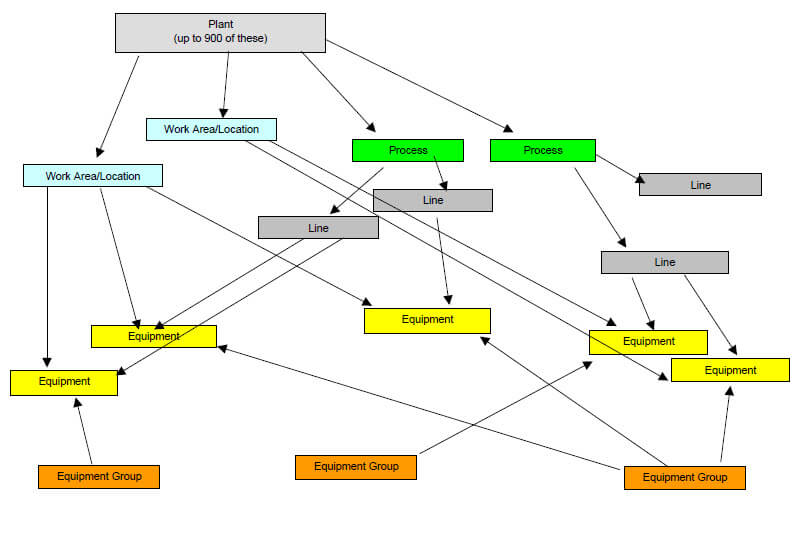
Plant Maintenance Software Equipment Hierarchy
It is important to understand that defining the labels of the equipment hierarchy should be done with some initial consideration of how the plant maintenance software will be used, your equipment layout and user buy-in. Do NOT let let disagreement of the equipment hierarchy labels prevent putting the plant maintenance software into use though. If its discovered later that the initial set-up of the equipment hierarchy isn't really what is needed then it is a very simple matter to change the label names. Here is a document that explains this further.
Contact us for a free consultation or online demonstration of the software with your maintenance operation's equipment and equipment hierarchy.